TamakiMES Data Model Introduction
This document provides an overview of the data model used in TamakiMES. The model is designed to track and manage key entities involved in manufacturing operations, supporting functions like **OEE (Operational Equipment Effectiveness) **, yield and lot tracing, inventory tracking, and production scheduling.
Core Modules and Their Relationships
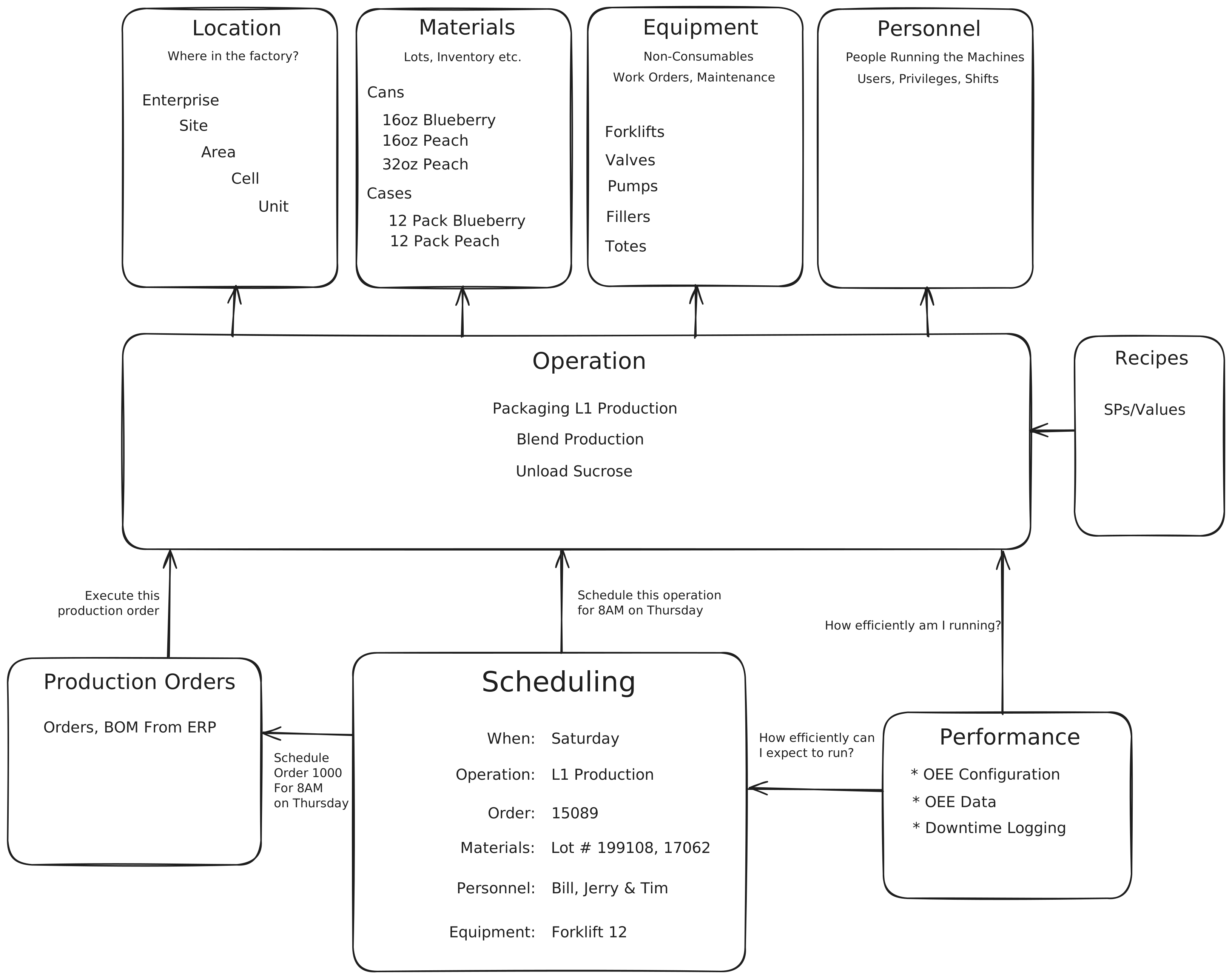
-
Location
Defines where an operation or equipment is located within the factory. The hierarchy includes:- Enterprise: The top level, representing the entire organization.
- Site: Represents different factory sites.
- Area: Subdivisions within a site, like departments.
- Cell: Smaller areas within an area, such as production cells.
- Unit: The smallest functional unit within a cell.
Each piece of equipment or operation is associated with a specific location to provide a clear context for production tracking.
-
Materials
Manages the definition and classification of materials in various formats:- Cans: Individual units like 16oz or 32oz cans.
- Cases: Bundled units like 12-pack cases.
Materials define the catalog of items, their classes and reason codes, and are linked to operations to enable lot tracing and yield calculation.
-
Inventory
Tracks physical stock and lots of materials within the plant:- Inventory: On-hand quantities of a material at a location.
- Inventory Lots: Individual lots used for lot tracing and genealogy.
Inventory records are consumed and produced by operations, providing the running picture of stock on hand.
-
Equipment
Represents the physical assets within the facility, organized into a class hierarchy:- Equipment Classes: Hierarchical categories such as Pumps, Conveyors, or Sensors.
- Equipment: Individual assets, optionally tied to a location.
- Equipment Properties / Property Values: Configurable metadata attached to each asset.
Equipment provides the resources associated with operations and the source of OEE performance data.
-
Personnel
Contains information about the people operating the equipment and running the machines. This includes:- Users and Privileges: Access controls for operators, supervisors, and other roles.
- Departments, Roles, and Certifications: Organizational structure and qualifications for personnel.
Personnel can be associated with operations and scheduling, ensuring appropriate staffing.
-
Shift
Defines the working shifts and shift schedules used across the plant:- Shifts: Named time windows (e.g., Day, Night) that structure the working day.
- Shift Records: Concrete occurrences of a shift, used to group activity and assign personnel.
Shifts provide the temporal context for grouping operations, OEE data, and staffing.
-
Operation
Represents the primary production tasks, such as:- Packaging L1 Production
- Blend Production
- Unload Sucrose
Operations are central to the system and interact with most other modules, including:
- Materials: For tracking input and output.
- Equipment and Personnel: For associating resources and workforce.
- Production Orders and Scheduling: To execute and manage tasks based on production demands.
- Performance: To measure efficiency and output quality.
-
Production Orders
Tracks orders and Bill of Materials (BOM) data from an ERP system. Production orders:- Schedule and execute specific operations.
- Define which materials and recipes to use for production tasks.
Orders are essential for planning and are linked to scheduling, ensuring operations align with production goals.
-
Scheduling
Specifies when an operation should occur, detailing:- Date and Time: Such as “8 AM on Thursday” for specific operations.
- Order: Links to production orders.
- Materials, Personnel, and Equipment: Allocates necessary resources to meet production schedules.
Scheduling ensures that resources, orders, and personnel align with production timelines and goals.
-
OEE
Tracks Operational Equipment Effectiveness (OEE) and logs downtime:
- OEE Data: Monitors how efficiently the equipment and operations run.
- Downtime Logging: Records any time equipment is non-operational, impacting productivity.
The performance data helps in evaluating and improving the efficiency of operations and scheduling.
- Document
Stores documents and their associated binary data for attachment to other records:
- Documents: Metadata describing an uploaded file.
- Document Data: The stored binary content of each document.
Documents provide supporting files and references that can be linked across the model.
- Unit of Measure
Defines the units used to quantify materials and inventory and how they relate to one another:
- Units of Measure: Named units such as kilograms, litres, or cases.
- Unit of Measure Conversions: Conversion factors between units.
Units of measure standardize quantities used throughout materials, inventory, and operations.
- Dashboard
Defines configurable user dashboards and widget templates used for displaying KPIs and production context:
- Dashboards: Saved layouts, grid settings, and serialized instances for the UI.
- Widgets: Reusable templates that render Perspective views with sizing constraints.
- Widget Parameters/Types: Parameter metadata, default values, and editor configuration views.
- Metering
Tracks utility usage (such as water, electricity, or gas) consumed by equipment:
- Meter Types: Categories of metered utility, each with a default cost and units of measure.
- Meter Configurations: Per-equipment meter definitions and data-collection parameters.
- Meter Records: Captured usage and cost over a time window for an equipment meter.
Metering quantifies resource consumption per piece of equipment, supporting cost and efficiency analysis.
Each module plays a specific role in the overall MES framework, enabling TamakiMES to provide comprehensive, real-time insights into production performance, inventory management, and operational efficiency. The common object model underpins this structure, ensuring consistency and traceability across all records.
Common Object Model
The common object model defines a set of base entities that standardize core fields, provide auditing capabilities,
and offer flexible, reusable components across the schema. This is primarily achieved through the BaseEntity class.
BaseEntity Class
The BaseEntity class serves as the foundation for all major entities in TamakiMES, providing essential fields and
functions such as:
-
ULID Identifiers: Each entity instance uses a unique, Universally Unique Lexicographically Sortable Identifier ( ULID) as its primary key. ULIDs ensure consistency and traceability, especially in distributed systems, as they are both unique and ordered by time.
- ULIDs in TamakiMES can also have their cardinality adjusted to include a hash of a “parent” entity, allowing hierarchical relationships.
-
Audit Fields: The
BaseEntityclass includes standard fields for tracking creation and modification events:createdDateandcreatedBy: Automatically populated when a record is created.modifiedDateandmodifiedBy: Updated when a record is modified, enabling traceability of changes.- Custom Notes and Spare Fields: Three
sparefields (spare1,spare2, andspare3) are provided as optional text fields. These can be customized by users for additional context or metadata as needed.
-
Status and Metadata:
enabled: A Boolean field indicating if the entity is active.notes: Stores general information related to the entity, supporting more detailed context.
ULID Generator
The ULID generator is implemented as a custom identifier generator in Java. This generator creates ULIDs that are
unique across distributed systems and lexicographically sortable, which is ideal for systems that log events or need
consistent ordering by creation time. The generator:
- Combines timestamp and randomness to ensure uniqueness.
- Supports prefixing with a custom value, which can be derived from a parent entity, adding flexibility in hierarchies.
The generator uses Crockford’s Base32 encoding for encoding the timestamp and random segments, providing compact, sortable identifiers.
Hierarchical Paths in Entities - TODO add links to these pages
Several entities form a hierarchy (e.g., Location, MaterialClass, OeeDowntimeReason, PersonnelDepartment). This relationship is maintained by a column parent_id in each table that is used to keep a record's reference to its parent record. For easy querying and filtering this relationship is also displayed kept up to date in a path column as well. The path column contains a string with all the names of the hierarchy separated by a / delimiter and also ending in that same delimiter / (e.g., Enterprise/Site/Area/Cell/Unit/ for the Location entity). This allows for easy querying of all records that fall under a certain parent (e.g., all Locations under a specific Site) without needing to perform recursive queries.
NOTE: It is important to note that the path column in the data model always ends in a / but the Api model will not include the trailing / when returning the path to the user.
How Audit Fields Are Populated
The audit fields-createdBy, createdDate, modifiedBy, and modifiedDate-are handled automatically within the
common object model. They:
- Capture the current system user and timestamp at the time of creation or modification.
- Ensure every entity maintains a history of who made changes and when, supporting compliance and auditing.
Modular Structure and Interactions
TamakiMES is structured into interconnected modules, each handling a specific aspect of manufacturing operations. Below is a high-level view of the different modules and how they interact:
-
Operations Module: Manages production and material operations, including yield tracking and lot tracing. This module interfaces with:
- Inventory Module to update inventory levels based on production or material consumption.
- OEE Module to record performance data and calculate effectiveness based on equipment usage.
-
OEE Module: Tracks equipment performance and provides OEE calculations. It integrates with:
- Equipment Module to gather data on equipment utilization and downtime.
- Operations Module to relate performance and downtime data to specific production tasks.
-
Inventory Module: Manages inventory levels and lots of materials within the plant. It interacts with:
- Operations Module to track material consumption and production output.
- Materials Module to resolve item definitions, classes, and units of measure for stock.
This structure allows TamakiMES to maintain clear boundaries between functional domains while ensuring a cohesive flow of data. Each module communicates through well-defined interfaces, leveraging the common object model for consistency across records and facilitating easy integration with external systems.
This high-level structure gives users an understanding of how different areas of TamakiMES interact and how the common object model underpins key functionality and consistency across the system.