Calculation Config
Navigation: OEE → OEE Configuration → Calculation Config
Description:
- OEE metrics are normally computed on demand by scanning raw OEE, state, and mode records, which is the most exact but can be slow over long time ranges. The Calculation Config tab configures OEE roll-ups: pre-computed Calculation Records that store the full set of metrics (Availability, Performance, Quality, OEE, Utilization, and TEEP) for a fixed time bucket, so dashboards can read a single row instead of aggregating thousands of raw records. A roll-up trades a very small amount of accuracy for speed: a record that spans a period boundary is apportioned by weighted average (which assumes production was spread evenly across it), so the on-demand raw calculation remains the most exact.
- Each row configures roll-ups for one period type at the selected location. A background job runs daily at midnight, reads the enabled configurations, and generates records for any closed periods since each configuration last ran.
- See the OEE Calculation Configuration and OEE Calculation Record data models for the underlying structure.
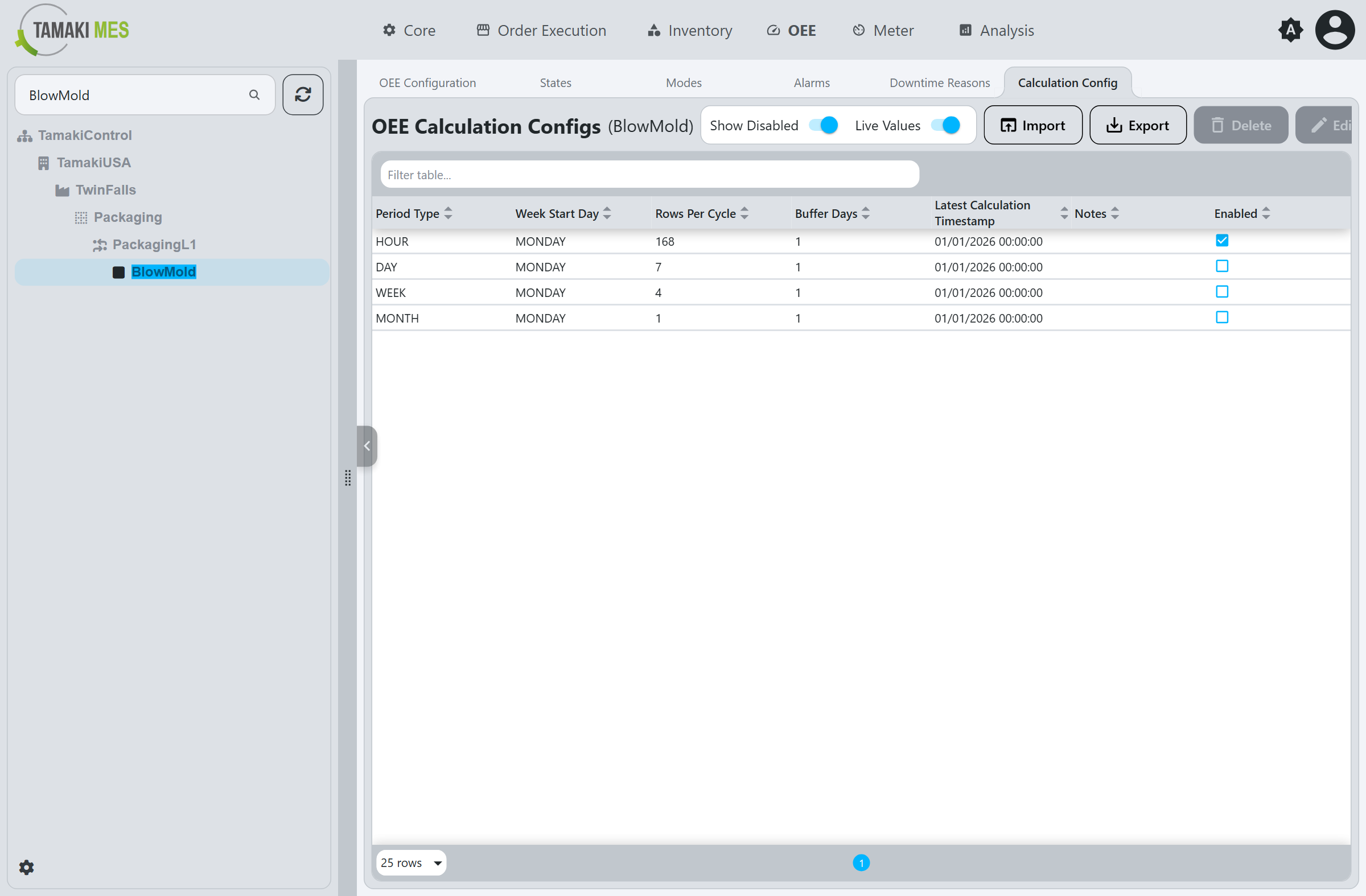
The table lists the roll-up configurations for the selected location, one per period type, showing the Period Type, Week Start Day, Rows Per Cycle, Buffer Days, Latest Calculation Timestamp, Notes, and Enabled status of each.
- Show Disabled toggles whether disabled configurations are listed.
- Live Values toggles whether the timestamps refresh live.
Workflow
Create a Calculation Config
- Click
Create New. - Fill out the fields in the popup (see Calculation Config Fields).
- Click
Confirm.
Edit a Calculation Config
- Select a configuration in the table.
- Click
Edit. - Modify the fields (see Calculation Config Fields).
- Click
Confirm.
The Delete button removes the selected configuration. Import and Export move configurations to and
from a CSV or JSON file.
Calculation Config Fields
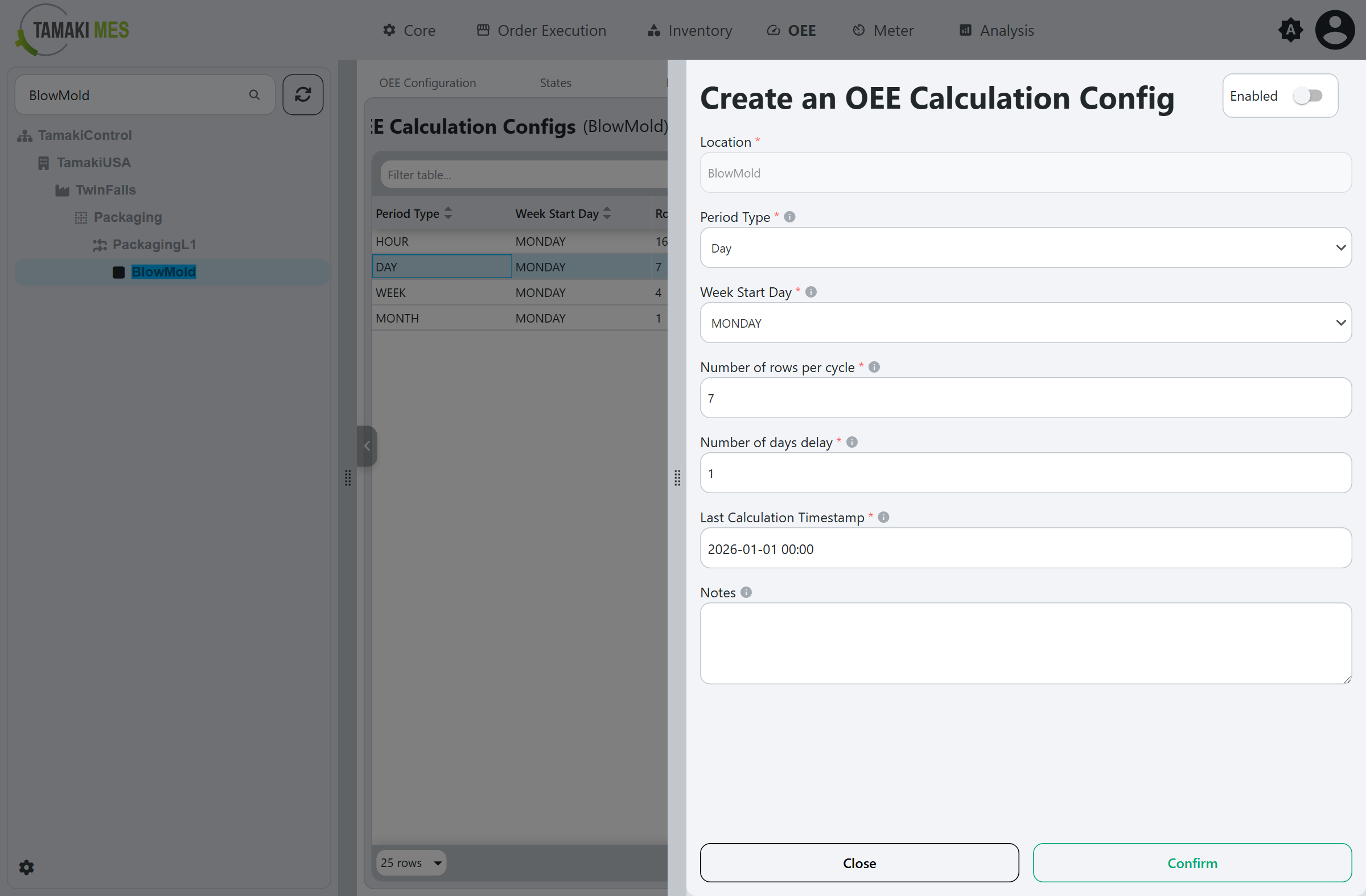
Enabled
Toggles the roll-up on or off. Disabled configurations are skipped by the background job.
Location
The location whose records are rolled up.
Period Type
The granularity of the roll-up bucket. At most one configuration may exist per location per period type:
- Hour: One calendar hour.
- Day: One calendar day (midnight to midnight, in the gateway's time zone).
- Week: One calendar week (see Week Start Day).
- Month: One calendar month.
- Shift: A single shift instance, bounded by its shift record's start and end times.
Week Start Day
The day of the week that marks the start of a Week period. Only meaningful when the Period Type is
Week. Defaults to Monday.
Number of rows per cycle
The maximum number of records the background job generates
for this configuration per run. For an Hour period, a value of 24 closes one day of hourly records
per run. A high value (for example 200) combined with an early
Last Calculation Timestamp rapidly backfills historical data. The job
never generates a record for a period that has not yet closed.
Number of days delay
The number of days to wait after a period closes before the
job calculates it. This gives late-arriving data time to be recorded before the period is rolled up.
Must be at least 1. Defaults to 1.
Last Calculation Timestamp
The end time of the most recently generated record for this configuration; the point the background job resumes from each run. Setting this to an earlier date triggers a targeted backfill: the job regenerates records from that point forward, up to Number of rows per cycle per run, until it catches up to the present.
Notes
Optional comments about the configuration.